
Is your Moen kitchen faucet leaking or dripping? Don’t worry! You can usually fix a Moen faucet dripping by replacing the internal cartridge. This guide will walk you through how to change Moen kitchen faucet cartridge with simple steps. We’ll cover everything you need to know for successful Moen faucet repair.
Many people wonder if they can fix a leaky faucet themselves. Yes, you absolutely can! Changing a single handle Moen faucet cartridge is a common and manageable DIY project. This guide aims to make the process as clear as possible, even if you’re new to Moen faucet maintenance.
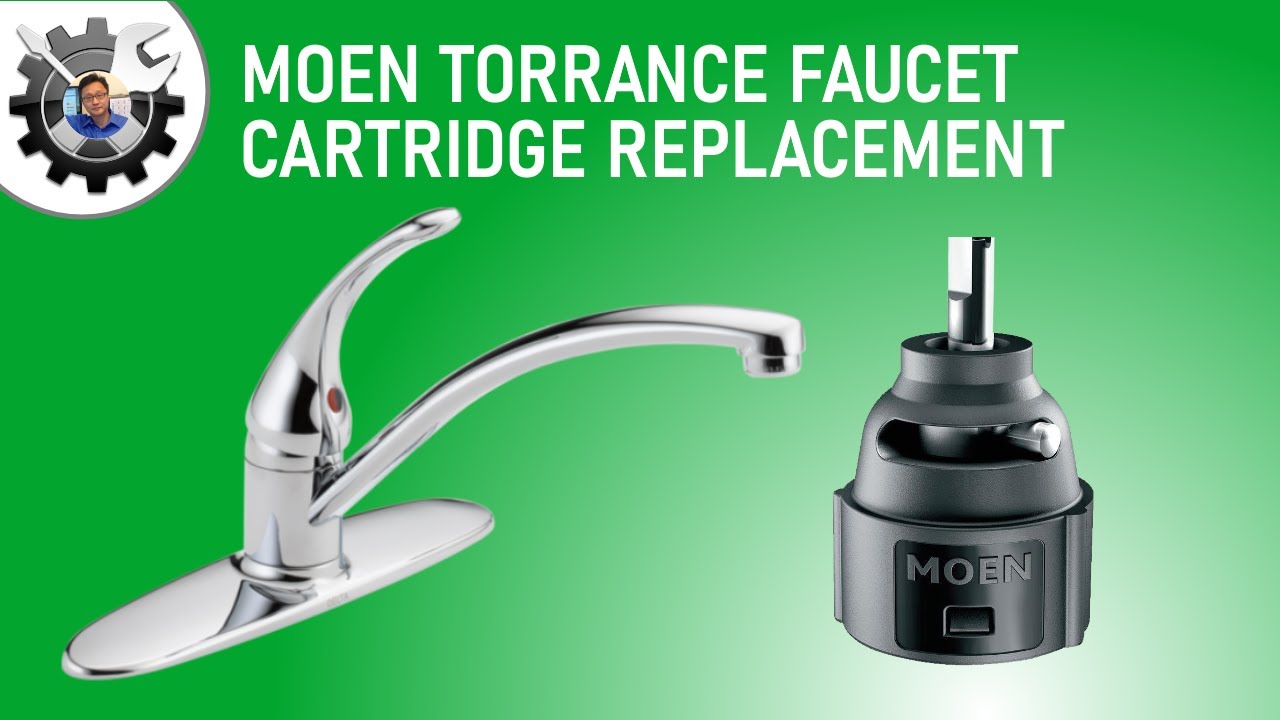
Image Source: i.ytimg.com
Why Replace Your Moen Faucet Cartridge?
Over time, the internal components of your faucet, particularly the cartridge, can wear out. This wear and tear can lead to several common issues:
- Leaks: The most obvious sign is water escaping when the faucet is turned off.
- Dripping: A persistent drip from the spout is frustrating and wastes water.
- Stiff Handle: The handle may become difficult to turn or operate smoothly.
- Temperature Control Issues: You might struggle to get the desired hot or cold water mix.
- Low Water Pressure: A damaged cartridge can sometimes restrict water flow.
If you’re experiencing any of these problems, it’s highly likely that the cartridge is the culprit. Fortunately, replacing it is a straightforward way to restore your faucet’s functionality and how to fix a Moen faucet.
What You’ll Need: Tools and Materials
Before you begin, gather these essential items. Having everything ready will save you time and prevent frustration during your Moen single handle repair.
- Replacement Cartridge: This is the most crucial part. You’ll need the correct Moen 1225 cartridge or the specific model for your faucet. More on identifying the right cartridge later.
- Adjustable Wrench: For loosening and tightening nuts and fittings.
- Phillips Head Screwdriver: For removing decorative caps and handle screws.
- Flat Head Screwdriver: Often needed for prying off decorative caps or handle screws.
- Allen Wrench (Hex Key): Some faucet handles are secured with a small set screw requiring an Allen wrench. Moen often uses these.
- Pliers (Needle-nose or regular): Helpful for gripping and pulling out the old cartridge.
- Rag or Towel: To catch any residual water and to protect your sink’s finish.
- Bucket or Container: To place under the faucet to catch drips.
- Penetrating Oil (Optional but Recommended): For loosening stubborn parts.
- Plumber’s Grease or Silicone Lubricant: To lubricate the new cartridge for easier installation and smoother operation.
- Camera or Smartphone: To take pictures as you disassemble, which can be a lifesaver when putting it back together.
- Safety Glasses: To protect your eyes from debris or water splashes.
Identifying Your Moen Faucet and Cartridge
This is a critical step. Using the wrong cartridge will prevent your faucet from working correctly or might not fit at all.
How to Find Your Faucet Model
- Check the Faucet Base: Look for a Moen logo or a model number printed on the faucet itself, often on the back or underside of the spout or base.
- Examine Your Receipt or Packaging: If you still have them, your original purchase records will contain the model information.
- Look for Distinctive Features: Moen faucets have various styles. Common single-handle models include the “Monticello,” “Eva,” “Arris,” “Brantford,” and many others. Researching your faucet’s visual appearance can help.
- Take Pictures and Visit the Moen Website: If you can’t find a model number, take clear photos of your faucet from different angles. Visit the Moen website’s “Support” or “Parts Finder” section. You can often use their visual guides or descriptions to identify your faucet.
- Contact Moen Customer Service: If all else fails, Moen’s customer service is excellent. They can help you identify your faucet and the correct Moen faucet parts based on a description or photo.
The Moen 1225 Cartridge
The Moen 1225 cartridge is one of the most common cartridges used in Moen single-handle faucets. If your faucet is a widespread single-handle model manufactured in the last 30 years, there’s a good chance it uses a 1225. However, Moen also uses other cartridges like the 1234 (for newer single-handle faucets) and various older ceramic disc cartridges.
Table 1: Common Moen Cartridge Types and Their Applications
| Cartridge Type | Common Faucet Series/Models | Key Features |
|---|---|---|
| 1225 | Monticello, Brantford, Chateau, Adler, Arbor, etc. | Older, widely used single-handle cartridge. |
| 1234 | Arbor, Eva, Sleek, Align, Weymouth, etc. | Newer, updated single-handle cartridge with improved design. |
| 1255 | M-Pact valve system (often behind the wall) | Used in shower and tub valves, less common for kitchen sinks. |
| 1200 | Older two-handle faucets | Used in older two-handle faucets for temperature control. |
Crucial Tip: Always confirm the exact cartridge model required for your specific faucet to ensure a successful Moen faucet repair.
Step-by-Step Guide to Replacing Your Moen Cartridge
Let’s get started! Follow these steps carefully to replace Moen faucet cartridge.
Step 1: Turn Off the Water Supply
This is the most important first step.
- Locate Shut-Off Valves: Look under your kitchen sink. You should see two valves connected to the hot and cold water lines that go up to the faucet.
- Turn Off Valves: Turn the handles of both the hot and cold water valves clockwise until they are fully closed.
- Test: Turn on the faucet to ensure the water is completely shut off. A little residual water might drip out, but no more should flow. If water continues to flow, you may need to shut off the main water supply to your house.
Step 2: Remove the Faucet Handle
The handle is typically secured by a hidden screw or a set screw.
- Find the Decorative Cap: On most Moen single-handle faucets, there’s a small decorative cap on the front or side of the handle. This cap often has a red or blue indicator for hot and cold.
- Pry Off the Cap: Gently use a small flathead screwdriver or a utility knife to pry off this cap. Be careful not to scratch the faucet finish. A thin rag placed around the cap can help protect the surface.
- Locate the Handle Screw: Beneath the cap, you’ll find a screw. It’s usually a Phillips head screw, but some models use a small Allen screw.
- Remove the Screw: Use the appropriate screwdriver or Allen wrench to remove the screw. Keep the screw safe, as you’ll need it to reattach the handle.
- Pull Off the Handle: Once the screw is removed, grasp the handle firmly and pull it straight up and off the faucet body. It might be a bit stiff due to mineral deposits. If it’s stuck, try wiggling it gently or applying a bit of penetrating oil around the base. Avoid excessive force.
Step 3: Remove the Escutcheon Cap and Packing Nut
Now you’ll expose the cartridge itself.
- Remove the Escutcheon Cap: This is a decorative dome-shaped piece that covers the cartridge. It usually unscrews by hand or with the help of pliers wrapped in a cloth to prevent marring the finish. Turn it counter-clockwise.
- Identify the Packing Nut (or Retaining Clip): Depending on your faucet model, you’ll either have a packing nut or a retaining clip holding the cartridge in place.
- Packing Nut: This is a brass nut that surrounds the top of the cartridge. You’ll need your adjustable wrench to unscrew it. Turn it counter-clockwise.
- Retaining Clip: Some Moen cartridges are held in place by a small U-shaped metal clip. You’ll typically need needle-nose pliers or a small flathead screwdriver to carefully pull this clip straight up and out. Note its orientation for reinstallation.
Step 4: Remove the Old Cartridge
This is often the most challenging part of the Moen faucet repair.
- Grasp the Cartridge: With the packing nut or clip removed, you should be able to see the top of the cartridge.
- Use the Cartridge Removal Tool (if applicable): Moen often provides or sells a specific cartridge removal tool for certain models. This tool attaches to the cartridge and gives you leverage to pull it out. Check if your faucet came with one, or if you purchased a replacement cartridge, it might be included.
- Wiggle and Pull: If you don’t have a special tool, use pliers to grip the cartridge’s stem or the ears on its sides. Wiggle the cartridge back and forth while pulling upward. Be patient; it can be stubborn.
- Apply Penetrating Oil: If the cartridge is very difficult to remove, spray a bit of penetrating oil around its base where it enters the faucet body. Let it sit for a few minutes, then try again.
- If it Breaks: In rare cases, the plastic cartridge might break. If this happens, you’ll need to carefully remove any remaining pieces from the faucet body.
Step 5: Install the New Cartridge
Now it’s time to insert the new Moen 1225 cartridge or your replacement.
- Lubricate the O-rings: Apply a thin layer of plumber’s grease or silicone lubricant to the O-rings on the new cartridge. This helps it slide in easily and ensures a good seal.
- Align the New Cartridge: Most Moen cartridges have specific alignment tabs or notches. Make sure these align correctly with the slots or openings in the faucet body. Refer to the instructions that came with your new cartridge or the photos you took during disassembly. For the 1225 cartridge, the “hot” and “cold” indicators on the cartridge should align with the faucet body’s markings, if visible.
- Insert the Cartridge: Push the new cartridge straight down into the faucet body. It should seat firmly and smoothly. If you encounter resistance, don’t force it. Remove it and recheck the alignment.
- Reinstall the Retaining Clip or Packing Nut:
- Retaining Clip: Slide the U-shaped clip back into its original position, ensuring it securely holds the cartridge.
- Packing Nut: Screw the packing nut back on clockwise. Tighten it firmly with your adjustable wrench, but don’t overtighten, as this can damage the cartridge or faucet.
Step 6: Reassemble the Faucet
Now, put everything back in reverse order.
- Replace the Escutcheon Cap: Screw the decorative dome back onto the faucet body by hand.
- Reattach the Handle: Slide the handle back onto the cartridge stem, ensuring it’s properly aligned.
- Insert and Tighten the Handle Screw: Screw the handle screw back in securely.
- Replace the Decorative Cap: Snap the small decorative cap back into place.
Step 7: Turn the Water Supply Back On and Test
- Turn On Water Valves: Slowly turn both the hot and cold water shut-off valves under the sink counter-clockwise to restore the water supply.
- Check for Leaks: Inspect the faucet and the connections under the sink for any signs of leaks.
- Test Faucet Operation: Turn on the faucet and check the hot and cold water flow. Operate the handle through its full range of motion. Make sure there are no drips when the faucet is off.
Congratulations! You have successfully completed your Moen faucet repair and learned how to replace Moen faucet cartridge.
Troubleshooting Common Issues
Even with careful work, you might encounter a few hiccups.
Faucet Still Leaking or Dripping
- Cartridge Alignment: Ensure the new cartridge is perfectly aligned. Even a slight misalignment can cause issues.
- Packing Nut Tightness: If it’s a packing nut, it might need to be tightened a bit more. Turn it in small increments and test.
- Debris in Faucet Body: Small pieces of debris or mineral buildup inside the faucet body can prevent the cartridge from seating properly. You might need to remove and clean the faucet body.
- Faulty New Cartridge: While rare, the new cartridge could be defective.
- Other Worn Parts: In older faucets, other internal components like seals or O-rings within the faucet body might be worn, requiring further attention.
Handle is Loose or Wobbly
- Handle Screw: The screw holding the handle might not be tight enough.
- Cartridge Not Seated: If the cartridge isn’t fully seated, the handle might not fit correctly.
- Damaged Handle Post: The part of the cartridge that the handle attaches to might be damaged.
Water Temperature Issues
- Cartridge Orientation: Double-check that the hot and cold sides of the cartridge are correctly oriented within the faucet body.
- Mixing Chamber Blockage: Debris could be blocking the mixing chamber within the faucet.
Maintaining Your Moen Faucet for Longevity
Proper Moen faucet maintenance can extend the life of your faucet and prevent future issues.
- Regular Cleaning: Wipe down your faucet regularly with a soft cloth and mild soap to prevent mineral buildup.
- Avoid Harsh Cleaners: Never use abrasive cleaners or scouring pads, as they can damage the finish and internal components.
- Address Leaks Promptly: Don’t ignore small drips. They can worsen over time and waste significant amounts of water.
- Check Aerator: Periodically unscrew the aerator at the tip of the spout and clean out any sediment or debris. This can improve water flow and pressure.
- Know Your Parts: Keep a record of your faucet model and the cartridge type. This will make future Moen faucet parts purchases much easier.
Frequently Asked Questions (FAQ)
Q1: How often should I replace a Moen faucet cartridge?
A1: There’s no set schedule. Cartridges typically last for many years, but their lifespan depends on water quality, usage, and maintenance. You’ll know it’s time to replace it when you experience leaks, drips, or handle issues.
Q2: Can I use a generic cartridge instead of a Moen brand one?
A2: While some generic cartridges might appear similar, it’s highly recommended to use genuine Moen replacement parts. They are designed to fit and function perfectly with your Moen faucet, ensuring optimal performance and longevity. Using non-Moen parts can void warranties and lead to further problems.
Q3: My faucet has two handles. Do I need a different type of cartridge?
A3: Yes. This guide primarily focuses on single-handle faucets. Two-handle faucets use different valve mechanisms and cartridges (like the Moen 1200 for older models). The process for replacing those will vary.
Q4: How do I know if I have the Moen M-Pact valve system?
A4: The M-Pact system is a common valve system used by Moen, especially in showers and tubs, but sometimes in kitchens too. It allows you to replace the cartridge without removing the handle or trim plate. If your faucet was installed within the last 10-15 years, it might have an M-Pact valve. You’ll typically see a large decorative trim plate and often a separate valve body behind the wall or sink. The cartridge replacement procedure for M-Pact is slightly different but still involves accessing the cartridge after removing the handle and trim.
Q5: What if the cartridge is stuck and I can’t remove it?
A5: Patience is key. Try applying penetrating oil and letting it soak. Ensure you’ve removed all retaining clips or packing nuts. If it’s still stubbornly stuck, you may need to call a professional plumber, as forcing it too much could damage the faucet body beyond repair.
By following these detailed steps, you can confidently tackle the task of changing your Moen kitchen faucet cartridge. Enjoy your leak-free sink!