
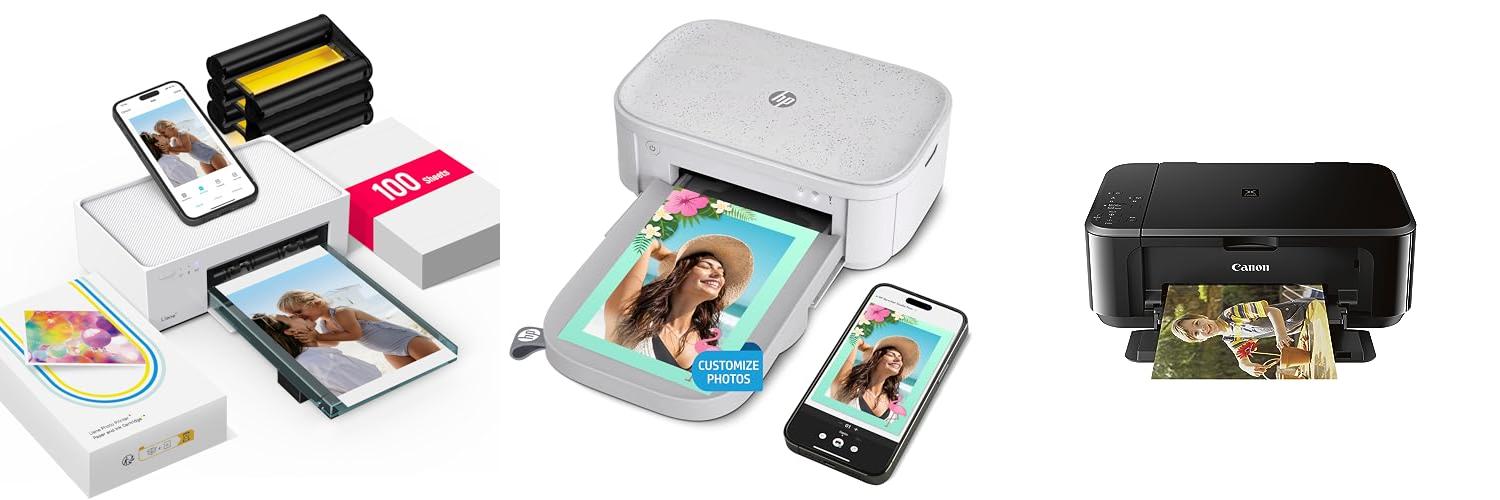
Remember that perfect vacation photo, the one that captures pure joy and a beautiful sunset? Or maybe it’s a cherished family portrait, filled with laughter and love. These moments are precious, but sometimes, just seeing them on a screen isn’t enough. You want to hold them, display them, and share them in a way that truly brings them to life. That’s where photo printers come in, transforming digital memories into tangible treasures.
However, diving into the world of photo printers can feel overwhelming. So many brands, so many features, and prices that range from affordable to quite pricey. It’s easy to get lost in the technical jargon and wonder, “Which one is actually right for me?” You want crisp, vibrant prints that look just like the real thing, without spending a fortune or wrestling with complicated setup. You might be worried about ink costs, print quality, or how easy it is to connect your phone or camera.
This guide is here to cut through the confusion. We’ll break down what really matters when choosing a photo printer. You’ll learn about the different types available, understand key features like resolution and ink systems, and discover what to look for to get the best value for your money. By the end, you’ll feel confident and ready to pick a printer that will make your favorite photos shine.
Our Top 5 Photo Printers Recommendations at a Glance
Top 5 Photo Printers Detailed Reviews
1. Liene M100 4×6” Photo Printer

Rating: 9.2/10
The Liene M100 4×6” Photo Printer is a user-friendly and portable device that lets you print your favorite memories directly from your smartphone or PC. It uses thermal dye sublimation technology to create vibrant, full-color photos that are resistant to water, scratches, and fading. The printer comes with 100 sheets of photo paper and 3 ink cartridges, so you can start printing right away.
What We Like:
- Easy to set up and use, perfect for printing photos from your phone.
- The Wi-Fi hotspot feature allows for a stable connection without needing external networks.
- You can print from up to 5 devices at the same time, making it great for sharing.
- The Liene App lets you customize your photos with borders, filters, and brightness adjustments.
- It’s compact and has a magnetic design for easy storage.
- The photos have a superior quality with vibrant colors and a protective laminate.
- You can even print ID and Visa photos from home.
What Could Be Improved:
- It’s important to clean the print head if you notice any smudges on your photos.
- Make sure the ink cartridge is clicked in place before printing.
The Liene M100 photo printer is a fantastic way to bring your digital photos to life. It’s a fun and easy tool for preserving your precious moments.
2. HP Sprocket Studio Plus 4×6″ Wireless Instant Photo Printer – Wi-Fi

Rating: 8.8/10
The HP Sprocket Studio Plus 4×6″ Wireless Instant Photo Printer is a fun and easy way to print your favorite memories. It connects wirelessly to your phone, letting you print vibrant, colorful pictures right away. You can even make your photos extra special with the editing app before you print them.
What We Like:
- Prints photos that last a long time and won’t smudge or fade.
- Lets you decorate your pictures with stickers, frames, and filters.
- Prints dry-to-the-touch 4×6” photos super fast from your smartphone.
- Connects easily to your phone using Wi-Fi and the simple HP Sprocket app.
- Offers fun ways to take pictures, like creating collages or photobooth strips.
What Could Be Improved:
- The cost of photo paper refills might add up over time.
- The printer is designed for 4×6″ photos only, so you can’t print other sizes.
This printer makes sharing and displaying your photos simple and exciting. It’s a great way to bring your digital memories into the real world.
3. Canon Pixma MG3620 Wireless All-in-One Color Inkjet Printer with Mobile and Tablet Printing

Rating: 9.5/10
The Canon Pixma MG3620 is a black, wireless printer that does it all! It prints, copies, and scans. You can easily print and scan from your phone or tablet. This printer is also good for the environment.
What We Like:
- It’s a 3-in-1 printer: print, copy, and scan.
- You can print and scan right from your phone or tablet.
- It automatically prints on both sides of the paper (auto 2-sided printing).
- It’s compact and saves space.
- It’s ENERGY STAR certified, which means it’s energy efficient.
- You can connect it to Alexa and get alerts when you’re low on ink. Alexa can even reorder ink for you from Amazon if you sign up for smart reorders.
- There’s no subscription needed for the smart reorder feature.
What Could Be Improved:
- The print speed is 9.9 pages per minute in black and 5.7 pages per minute in color. Some people might want a faster printer.
- It has a 100-sheet paper capacity. If you print a lot, you’ll need to refill it often.
This Canon Pixma printer is a smart choice for home use. Its wireless features and handy Alexa integration make printing and managing ink easy.
4. KODAK Dock Plus 4PASS Instant Photo Printer

Rating: 9.3/10
Capture and print your favorite moments instantly with the KODAK Dock Plus 4PASS Instant Photo Printer. This bundle includes everything you need to create beautiful 4×6 inch photos, and it even comes with 90 sheets of photo paper, so you can start printing right away!
What We Like:
- Super easy to use – just dock your phone, charge it, and print!
- Connects easily to your iPhone, iPad, or Android device with Bluetooth.
- You can print your photos right at home, making it super convenient.
- The Kodak 4PASS technology makes your photos look amazing. They have bright colors and a special coating.
- Photos are water-resistant and fingerprint-proof, so they will last a long time.
- You can choose to print photos with a border to write notes on, or print borderless for a bigger picture.
- This printer is a great value, especially with the bundle that includes extra paper.
- It also docks and charges your phone while you print.
What Could Be Improved:
- The initial setup might take a few minutes.
- While the paper is a good value, buying more can add up over time.
The KODAK Dock Plus 4PASS Instant Photo Printer makes printing memories simple and fun. It’s a fantastic way to share your photos with friends and family.
5. Epson PictureMate PM-400 Wireless Compact Color Photo Printer

Rating: 8.5/10
The Epson PictureMate PM-400 Wireless Compact Color Photo Printer in white is a fantastic little machine for making your favorite memories come to life. It’s designed to print beautiful photos right from your phone or tablet, making it super easy to share and display your snapshots.
What We Like:
- It prints gorgeous, borderless photos in sizes like 4″x6″ and 5″x7″.
- The printer is really small and light, so you can easily move it around or take it with you.
- You can print wirelessly from your iPad, iPhone, tablets, and smartphones.
- It prints a 4″x6″ photo in as little as 36 seconds, which is pretty fast!
What Could Be Improved:
- This printer only works with Epson ink cartridges. You can’t use third-party or refilled cartridges.
- If you try to use cartridges that aren’t genuine Epson ones, they might not work at all.
If you’re looking for a simple way to print your photos wirelessly and enjoy high-quality results, the Epson PictureMate PM-400 is a great option. Just remember to stick with Epson ink for the best experience.
Choosing Your Perfect Photo Printer: A Smart Guide
So, you want to print your amazing photos at home? That’s a great idea! Having your memories on paper is special. But with so many photo printers out there, how do you pick the best one? This guide will help you find the perfect printer for your needs.
Key Features to Look For
When you shop for a photo printer, keep these important features in mind:
- Print Quality: This is super important. You want your photos to look sharp and have bright, true-to-life colors.
- Print Size: Do you want to print small wallet-sized photos, standard 4×6 prints, or even bigger posters? Make sure the printer can handle the sizes you need.
- Speed: How fast do you need your prints? Some printers are quick, while others take a bit longer.
- Connectivity: How will you connect your phone or camera? Look for Wi-Fi, Bluetooth, or USB options.
- Ease of Use: Is the printer simple to set up and use? A clear screen and easy-to-follow instructions make printing a breeze.
- Ink Cartridges: Some printers use dye-based ink, which gives vibrant colors. Others use pigment-based ink, which lasts longer.
Important Materials and Technology
The ink and paper you use really matter for photo quality.
- Ink: Most photo printers use either dye-based or pigment-based inks. Dye inks produce very bright and vivid colors, perfect for vibrant prints. Pigment inks are more durable and resist fading better over time.
- Paper: Photo paper comes in different finishes like glossy, matte, and satin. Glossy paper makes colors pop. Matte paper has a smooth, non-shiny look. Satin paper offers a nice middle ground.
Factors That Affect Photo Quality
A few things can make your prints look amazing or a little less than perfect.
- Resolution: Higher resolution means more detail. Look for printers with a high DPI (dots per inch). This makes your photos look crisp and clear.
- Color Accuracy: Good printers reproduce colors very accurately. This means the colors on your print will look just like they do on your screen.
- Ink and Paper Combination: Using the right ink and paper together is key. Many printer brands recommend their own paper for the best results.
- File Quality: Always start with high-quality photo files. A blurry or low-resolution photo file will never print perfectly, no matter how good the printer is.
User Experience and Use Cases
Who will be using the printer and what will they use it for?
- For Beginners: If you’re new to photo printing, look for a printer that’s super easy to set up and use. Many all-in-one printers are great for simple home use.
- For Hobbyists: If you love photography, you might want a printer that offers more control over settings and can print larger sizes.
- For Families: Printing school pictures, vacation memories, or DIY projects is easy with a user-friendly printer.
- For Sharing: Some printers let you print directly from your phone or social media, making it simple to share your favorite moments.
Think about how you’ll use your printer most often. This will help you choose the right features.
Choosing a photo printer is exciting! By understanding these key features, materials, quality factors, and user needs, you’ll be well on your way to printing beautiful photos right at home.
Frequently Asked Questions About Photo Printers
Q: What is DPI and why is it important for photo printers?
A: DPI stands for dots per inch. It tells you how many tiny ink dots the printer can place in one inch. A higher DPI means more detail and sharper images, so your photos will look clearer.
Q: Should I choose a dye-based or pigment-based ink printer?
A: Dye-based inks give very bright and vibrant colors, great for everyday prints. Pigment-based inks are more durable and resist fading, making them better for photos you want to keep for a long time.
Q: Can I print photos directly from my smartphone?
A: Yes, many modern photo printers have Wi-Fi or Bluetooth. This lets you send photos directly from your phone or tablet without needing a computer.
Q: What’s the difference between glossy and matte photo paper?
A: Glossy paper has a shiny finish that makes colors look very bright and vibrant. Matte paper has a smooth, non-shiny finish that looks more subtle and can reduce glare.
Q: How do I get the best color accuracy from my photo prints?
A: Use high-quality photo files and consider using the photo paper recommended by your printer’s brand. Some printers also have color calibration tools to help match screen colors to print colors.
Q: Are all photo printers good for printing large photos?
A: No, not all photo printers can print large sizes. Some are designed for standard 4×6 prints, while others can handle larger formats like 8×10 or even bigger.
Q: How long do printed photos last?
A: The lifespan of a printed photo depends on the ink and paper used. Pigment-based inks and good quality photo paper, stored away from direct sunlight, can make photos last for decades.
Q: Do I need a special computer to use a photo printer?
A: Usually, no. Most photo printers connect to standard computers. Some don’t even need a computer at all, letting you print from memory cards or smartphones.
Q: What is a photo printer versus a regular inkjet printer?
A: Photo printers are specifically designed to produce high-quality photo prints with excellent color accuracy and detail. Regular inkjet printers can print photos, but photo printers usually do a much better job.
Q: Is it expensive to buy photo printer ink and paper?
A: The cost can add up, especially for high-quality ink and paper. It’s good to check the price of replacement ink cartridges and paper before you buy the printer to estimate your ongoing costs.
In conclusion, every product has unique features and benefits. We hope this review helps you decide if it meets your needs. An informed choice ensures the best experience.
If you have any questions or feedback, please share them in the comments. Your input helps everyone. Thank you for reading.