
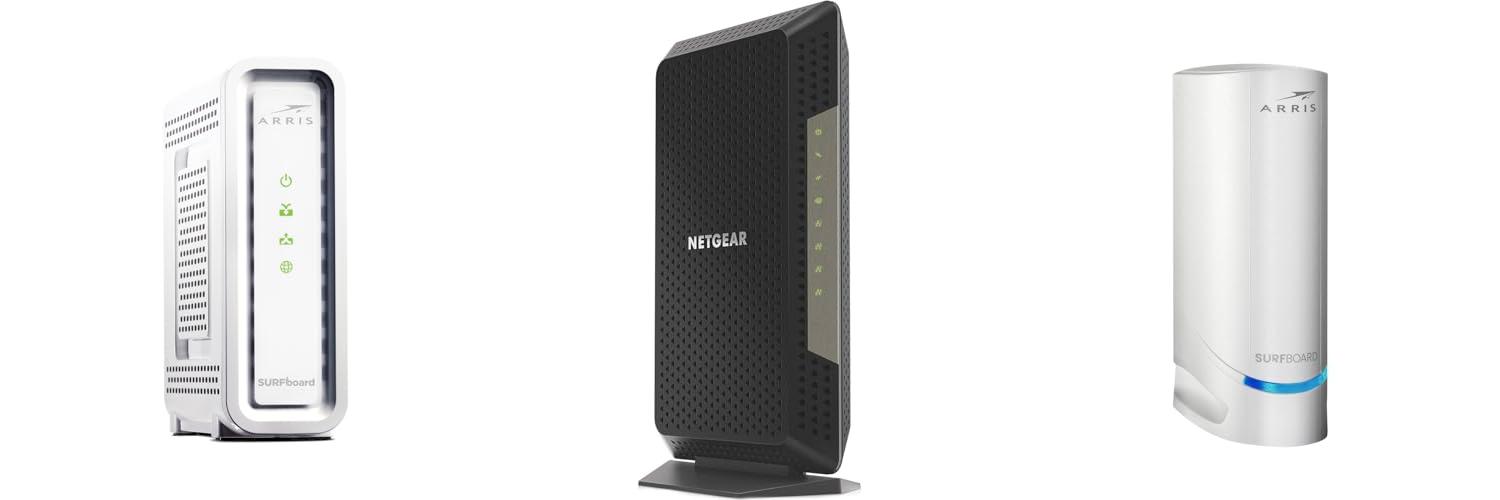
Ever wonder what magical box brings the internet to your home? It’s probably your cable modem! These unsung heroes are the gateway to your online world, letting you stream movies, play games, and connect with friends. But when it’s time to get a new one, the choices can feel overwhelming. Different speeds, fancy features, and confusing jargon can leave you scratching your head.
Choosing the wrong cable modem can lead to slow internet speeds, dropped connections, and a frustrating online experience. It’s like trying to run a marathon with shoes that are too small – it just doesn’t work well! You want to make sure you’re getting the best value and performance for your internet plan.
That’s where this guide comes in! We’re going to break down everything you need to know about cable modems. You’ll learn what to look for, understand the different types available, and discover how to pick the perfect modem that fits your needs and budget. Get ready to say goodbye to internet headaches and hello to a smoother, faster online life!
Our Top 5 Cable Modems Recommendations at a Glance
Top 5 Cable Modems Detailed Reviews
1. ARRIS (SB8200) – Cable Modem – Fast DOCSIS 3.1 32×8 Gigabit Cable Modem

Rating: 8.5/10
The ARRIS SURFboard SB8200 is a powerful cable modem built for speed and reliability. It uses the latest DOCSIS 3.1 technology, which is much faster than older versions. This means you can enjoy smoother streaming, quicker downloads, and lag-free gaming. It’s a great way to upgrade your home internet and save money by owning your modem instead of renting one.
What We Like:
- Blazing Fast Speeds: Experience the power of DOCSIS 3.1 for internet speeds up to 1 Gbps.
- Save Money: Ditch those monthly rental fees and put money back in your pocket.
- Wide Compatibility: Works with major cable providers like Xfinity, Cox, and Spectrum.
- Future-Ready Technology: DOCSIS 3.1 is the newest standard, ensuring your modem stays relevant.
- Easy Setup: Get online quickly with the user-friendly SURFboard Central App.
- Dual Ethernet Ports: Connect multiple devices or your Wi-Fi router with two Gigabit ports.
- Trusted Brand: ARRIS has a proven track record with millions of modems sold.
- Dedicated Support: Get help when you need it with live chat and phone support.
What Could Be Improved:
- No Built-in Wi-Fi: You’ll need to buy a separate Wi-Fi router to create a wireless network.
The ARRIS SB8200 is an excellent choice for anyone looking to boost their home internet speed and save money. It delivers top-tier performance and wide compatibility for a seamless online experience.
2. NETGEAR Nighthawk Cable Modem CM1200 – Compatible with All Cable Providers Including Xfinity by Comcast

Rating: 9.2/10
Upgrade your home internet with the NETGEAR Nighthawk Cable Modem CM1200. This powerful device combines a cable modem and a WiFi router, saving you money on rental fees. It’s built for speed, supporting internet plans up to 2 Gigabits per second. Plus, it keeps your network secure and your devices protected.
What We Like:
- Works with major cable providers like Xfinity, Spectrum, and Cox.
- Super-fast speeds for internet plans up to 2Gbps.
- Offers WiFi 6 (AX2700) for fast wireless connections.
- Handles up to 25 devices at once.
- Four 1 Gig Ethernet ports let you connect wired devices.
- Includes a 90-day subscription to NETGEAR Armor for security.
- Easy to set up and manage with the Nighthawk app.
- Saves you money by replacing your cable modem and WiFi router.
What Could Be Improved:
- Does not work with DSL providers like Verizon, AT&T, or CenturyLink.
- Cannot be used with bundled voice services.
The NETGEAR Nighthawk CM1200 is a fantastic all-in-one solution for fast and secure internet. It’s a smart choice for boosting your home network’s performance.
3. ARRIS (S34) – Cable Modem – Fast DOCSIS 3.1 Multi-Gigabit Cable Modem

Rating: 9.5/10
Ready to supercharge your home internet? The ARRIS (S34) cable modem is here to help! This powerful little box brings you lightning-fast internet speeds, perfect for everything from binge-watching your favorite shows to intense online gaming. It’s built by a brand trusted in millions of homes, so you know it’s reliable. Plus, it’s designed to work with major internet providers like Comcast Xfinity, Cox, and Spectrum. Get ready for a smoother, faster online experience.
What We Like:
- Super fast internet speeds up to 2.5 Gbps with DOCSIS 3.1 technology.
- Provides a stable and secure connection, ideal for streaming and gaming.
- Easy to set up using the SURFboard Central app – just plug it in and go!
- Works with popular internet providers like Xfinity, Spectrum, and Cox.
- Save money by owning your modem instead of renting, potentially saving up to $168 a year.
- Comes with a 2-year warranty for peace of mind.
What Could Be Improved:
- This modem does not have built-in Wi-Fi, so you’ll need to connect your own Wi-Fi router.
The ARRIS S34 modem is a smart investment for anyone looking to upgrade their internet speed and save money. It delivers excellent performance and is simple to get up and running.
4. Hitron CODA56 Multi-Gigabit DOCSIS 3.1 Modem

Rating: 8.9/10
Unlock blazing-fast internet speeds with the Hitron CODA56 Multi-Gigabit DOCSIS 3.1 Modem. This cable modem is designed to deliver speeds up to 2.33 Gbps with compatible providers, making it ideal for heavy internet users. It’s a modem only, meaning you’ll need to connect it to your own WiFi router for wireless access. Get ready for smoother gaming, seamless streaming, and crystal-clear video calls.
What We Like:
- Offers multi-gigabit speeds for super-fast internet.
- Works with major providers like Xfinity, Spectrum, and Cox.
- Helps you save money by ditching modem rental fees.
- DOCSIS 3.1 technology improves gaming and streaming performance.
- Hitron has a long history of reliable networking products.
- Comes with technical support and a product warranty.
What Could Be Improved:
- Requires a separate WiFi router to get wireless internet.
- You need a router with a 2.5 Gbps Ethernet port to get the fastest speeds.
- It’s not compatible with DSL, fiber, or satellite internet services.
- You must check with your ISP to confirm plan compatibility before buying.
This modem is a powerful upgrade for anyone looking to boost their home internet performance. If you have a fast internet plan and a compatible router, the Hitron CODA56 is a solid choice.
5. ARRIS (SB6190) – Cable Modem – DOCSIS 3.0 32×8 Gigabit Modem
![ARRIS (SB6190) - Cable Modem - DOCSIS 3.0 32x8 Gigabit Modem, For Comcast Xfinity, Cox, check with ISP for compatibility [Not for Spectrum] 1 Gbps Port, 800 Mbps Max Speed, 2 Year Warranty - White](https://m.media-amazon.com/images/I/31dUaMH9LML._SL500_.jpg)
Rating: 9.0/10
The ARRIS SB6190 is a powerful cable modem designed to give you fast internet speeds. It uses DOCSIS 3.0 technology with 32 downstream and 8 upstream bonded channels. This means it can handle a lot of data at once. It has one Gigabit Ethernet port, which is great for connecting to your Wi-Fi router or another device. This modem is a good choice if you have internet service from providers like Comcast Xfinity or Cox. Just make sure to check with your internet provider to see if it’s compatible with their service. It’s important to know that this modem doesn’t include Wi-Fi, and it doesn’t support cable digital voice service.
What We Like:
- It offers impressive speeds with its 32×8 channel bonding.
- The Gigabit Ethernet port ensures a fast connection to your router.
- It’s compatible with major internet providers like Comcast Xfinity and Cox.
- It comes with a 2-year warranty for peace of mind.
- The white color gives it a clean look.
What Could Be Improved:
- It’s not compatible with Spectrum internet service.
- It does not include Wi-Fi capabilities, so you’ll need a separate router.
- Cable digital voice service is not supported.
If you’re looking for a reliable and fast cable modem for your home internet, the ARRIS SB6190 is a solid option. Just remember to confirm compatibility with your ISP before purchasing.
Your Guide to Choosing the Best Cable Modem
Picking the right cable modem can seem tricky. This guide will help you understand what to look for. It will make sure you get the best internet speed for your home.
Key Features to Look For
1. DOCSIS Version
DOCSIS stands for Data Over Cable Service Interface Specification. This is like the language your modem speaks with your internet provider. Newer versions mean faster speeds.
- DOCSIS 3.0: This is a good starting point for most homes. It supports speeds up to about 1 Gbps.
- DOCSIS 3.1: This is the latest and greatest. It offers much faster speeds, up to 10 Gbps. If your internet plan is very fast, you will need DOCSIS 3.1.
2. Speed Support
Your modem needs to match your internet plan’s speed. If your plan is 100 Mbps, a modem that only supports 50 Mbps will slow you down. Check the modem’s maximum download and upload speeds. These are usually listed in Mbps (megabits per second).
3. Ethernet Ports
Most modems have at least one Ethernet port. This is where you plug in your computer or router. Some modems have more ports, which can be handy.
4. Wi-Fi Capability (Modem/Router Combos)
Some devices are both a modem and a router. These are called gateways or combo units. They have Wi-Fi built-in. If you want to save space and have fewer devices, a combo unit can be a good choice. However, separate modems and routers often offer more flexibility and better performance.
Important Materials and Build Quality
Cable modems are usually made of plastic. The main thing to consider is how well they are built. A sturdy modem feels solid. It won’t feel flimsy. Good ventilation is also important. Modems get warm when they work hard. Good airflow helps them run smoothly and last longer.
Factors That Improve or Reduce Quality
Factors That Improve Quality:
- Newer DOCSIS Version: As mentioned, DOCSIS 3.1 will give you much better performance than older versions.
- High-Speed Support: Make sure the modem can handle the speeds your internet provider offers.
- Reputable Brands: Stick with well-known brands. They often make more reliable products.
- Good Reviews: Read what other people say about the modem. Positive reviews usually mean a good product.
Factors That Reduce Quality:
- Outdated DOCSIS Version: Using an old DOCSIS 2.0 modem will severely limit your internet speed.
- Low Speed Ratings: A modem that can’t keep up with your internet plan will be a bottleneck.
- Poor Ventilation: If a modem overheats, it can cause connection problems and shorten its life.
- Cheaply Made Components: Some very cheap modems might use lower-quality parts that can fail sooner.
User Experience and Use Cases
A good cable modem makes your internet experience smooth. You can stream movies without buffering. You can play online games without lag. Downloading large files will be much faster.
- For Gamers: Low latency and high speeds are crucial. A DOCSIS 3.1 modem is best for serious gamers.
- For Streamers: Smooth HD or 4K streaming needs a modem that can handle high bandwidth.
- For Families: When multiple people are using the internet at once (streaming, gaming, working), a capable modem prevents slowdowns.
- For Basic Users: If you only check email and browse websites, a DOCSIS 3.0 modem might be perfectly fine.
Frequently Asked Questions (FAQ)
Q: Do I need to buy my own cable modem?
A: Not always. Your internet provider might give you one. But buying your own can save you money on monthly rental fees and often gives you better performance.
Q: How do I know which DOCSIS version I need?
A: Check your internet plan’s speed. If your plan is over 300 Mbps, you probably need DOCSIS 3.1. For speeds below that, DOCSIS 3.0 is usually fine.
Q: Can I use a modem that’s faster than my internet plan?
A: Yes, you can. It won’t make your internet faster than what you pay for. But it gives you room to upgrade your internet plan later without needing a new modem.
Q: What’s the difference between a modem and a router?
A: A modem connects your home to the internet. A router creates a Wi-Fi network in your home and lets multiple devices connect to the internet.
Q: Should I buy a modem/router combo unit?
A: It can be convenient. But separate units give you more control and often better Wi-Fi coverage.
Q: How long do cable modems usually last?
A: A good quality cable modem can last 3-5 years or even longer.
Q: Will my internet provider allow any cable modem?
A: No. Your provider has a list of approved modems. You must choose one from their list to ensure it works with their network.
Q: Where can I find a list of approved modems?
A: You can usually find this list on your internet provider’s website or by calling their customer service.
Q: What does “channel bonding” mean?
A: Channel bonding lets the modem use multiple channels to download and upload data. More bonded channels mean faster speeds.
Q: Is it hard to set up a new cable modem?
A: Most modems are easy to set up. You usually just plug them in and activate them online or by phone with your internet provider.
In conclusion, every product has unique features and benefits. We hope this review helps you decide if it meets your needs. An informed choice ensures the best experience.
If you have any questions or feedback, please share them in the comments. Your input helps everyone. Thank you for reading.