
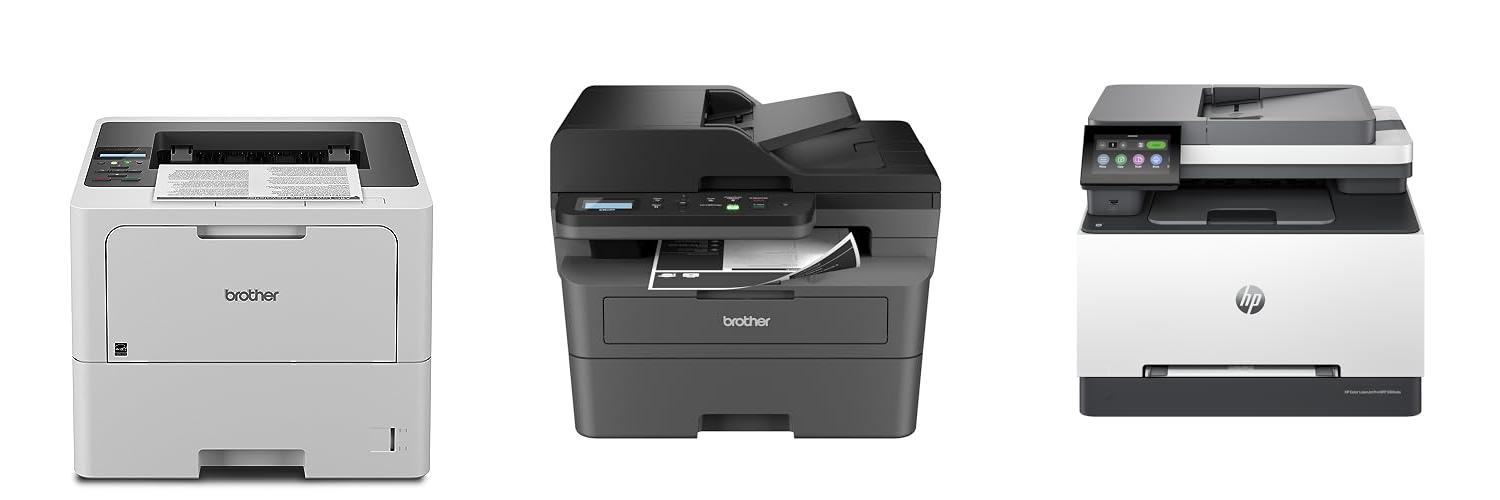
Imagine your business documents looking sharp, professional, and arriving at your customers’ hands without a smudge. That’s the power a good laser printer can bring. But when it’s time to buy one for your company, the choices can feel overwhelming. Do you need speed? Color? How much will it cost to keep it running? These questions can stop you in your tracks.
Choosing the right laser printer for your business isn’t just about picking a machine; it’s about finding a tool that boosts your productivity and keeps your operations smooth. Getting it wrong means wasted money, slow printing, and maybe even frustrated employees. But don’t worry, this guide is here to help.
By the time you finish reading, you’ll understand the key features to look for, how to match a printer to your specific business needs, and how to avoid common mistakes. We’ll break down the jargon and show you exactly what makes a laser printer a smart investment. Let’s dive in and find the perfect printing partner for your business.
Our Top 5 Laser Printer For Business Recommendations at a Glance
Top 5 Laser Printer For Business Detailed Reviews
1. Brother Professional Laser Printer with High-Speed 50 ppm Output

Rating: 9.0/10
The Brother HL-6210DW is a powerful monochrome laser printer built for busy offices. It prints super fast, keeps your documents safe, and connects easily to your network. This printer handles big jobs without breaking a sweat.
What We Like:
- Professional Performance: Prints at an amazing 50 pages per minute. This means your big print jobs finish quickly and look great.
- Superior Capacity: It has a big 520-sheet paper tray and a 100-sheet multipurpose tray. You can even add more trays to hold up to 1,660 sheets. This lets you print a lot without stopping.
- Advanced Connectivity: It connects to your office network with Gigabit Ethernet and dual-band wireless. This makes it easy for everyone to print and share. You can also print from your phone or tablet.
- Cost Efficiency: Uses ultra high-yield toner cartridges that print up to 18,000 pages. This saves you money on printing costs while still giving you excellent print quality.
- Security Excellence: Features Triple Layer Security. This protects your network, devices, and documents while they are being sent and printed.
- Duplex Capability: It automatically prints on both sides of the paper. This saves paper and is good for the environment.
What Could Be Improved:
- Monochrome Only: This printer only prints in black and white. If you need to print color documents, this might not be the best choice.
- No All-in-One Features: It is a printer only. It does not scan, copy, or fax.
The Brother HL-6210DW is an excellent choice for businesses that need fast, reliable, and secure monochrome printing. Its high capacity and cost-effective toner make it a smart investment for any office.
2. Brother DCP-L2640DW Wireless Compact Monochrome Multi-Function Laser Printer with Copy and Scan

Rating: 8.9/10
The Brother DCP-L2640DW is a smart, compact printer designed for small businesses. It handles printing, scanning, and copying all in one. This black and white laser printer helps you get work done quickly and easily.
What We Like:
- It’s a 3-in-1 machine: printer, scanner, and copier.
- It prints fast, up to 36 pages per minute.
- Scanning is quick too, with a 50-page automatic feeder.
- You can connect it in several ways: dual-band Wi-Fi, Ethernet, or USB.
- The Brother Mobile Connect app lets you print and scan from your phone.
- It works with Alexa for voice commands.
- The Refresh subscription trial offers savings on toner.
What Could Be Improved:
- It only prints in black and white, not color.
- The initial setup of the wireless connection might take a few steps.
The Brother DCP-L2640DW is a powerful tool for any small business needing efficient black and white document handling. Its range of features and connectivity options make it a valuable addition to your workspace.
3. HP Color Laserjet Pro MFP 3301sdw Wireless All-in-One Color Laser Printer

Rating: 9.2/10
Meet the HP Color Laserjet Pro MFP 3301sdw, your office’s new best friend! This all-in-one machine from America’s most trusted printer brand handles printing, scanning, and copying with ease. It’s built for small teams who need to produce professional-looking color documents and reports quickly. Get ready for vibrant colors and reliable performance that keeps up with your busy workday.
What We Like:
- Super fast printing speeds of up to 26 pages per minute in both black and color.
- Next-generation TerraJet toner makes colors pop and business documents look amazing.
- Includes a 250-sheet input tray, so you won’t have to refill paper constantly.
- Features a handy auto document feeder for fast scanning and copying.
- Auto 2-sided printing saves paper and time.
- Award-winning reliability means it’s built to last and handle tough jobs.
- Wireless connectivity makes it easy to print from anywhere in the office.
What Could Be Improved:
- This printer is designed to only work with Original HP toner cartridges.
- It will block cartridges that don’t have HP chips or circuitry.
The HP Color Laserjet Pro MFP 3301sdw is a solid choice for any office needing a dependable and feature-rich color all-in-one printer. Its speed and color quality make it a standout performer.
4. Brother Color Laser Printer All-in-One with Scanner

Rating: 8.6/10
The Brother MFC-L3720CDW is a powerful color laser all-in-one printer designed to boost your small office’s productivity. It prints, scans, copies, and faxes, making it a versatile tool for all your business needs. Its wireless capabilities and user-friendly interface simplify everyday tasks.
What We Like:
- Fast printing speeds of up to 19 pages per minute create sharp, professional-looking documents.
- Dual-band wireless and Wi-Fi Direct make it easy for everyone to connect and print from their devices.
- The 50-sheet auto document feeder and large 250-sheet paper tray mean less refilling and more printing.
- Automatic duplex printing saves paper by printing on both sides.
- The 3.5″ color touchscreen is easy to use, and you can set up custom shortcuts for quick access to cloud services like Google Drive and Dropbox.
- Manage the printer from your phone using the companion app, checking toner levels and even sending print jobs remotely.
What Could Be Improved:
- While it offers good performance, some users might desire even faster print speeds for very large print jobs.
- The initial setup, though guided, can take a little time for those less familiar with network printers.
This Brother printer is a fantastic choice for small offices needing a reliable and feature-rich machine. It handles daily printing demands efficiently, keeping your business moving forward.
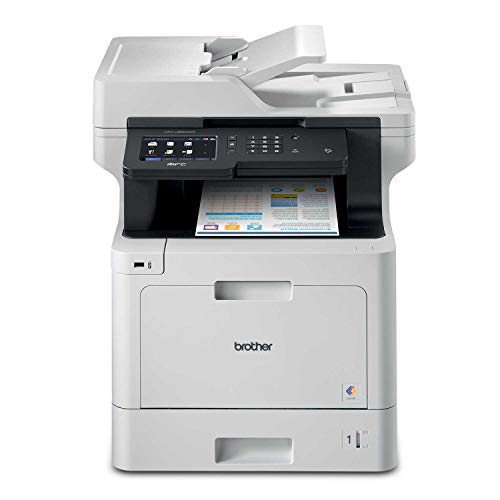
5. Brother MFC-L8900CDW Business Color Laser All-in-One Printer
Rating: 9.1/10
The Brother MFC-L8900CDW Business Color Laser All-in-One Printer is a powerful tool for busy offices. This printer handles big print jobs with ease. It’s ready for Amazon Dash Replenishment, so you won’t run out of ink.
What We Like:
- It’s an all-in-one solution: print, copy, scan, and fax all from one machine.
- It’s built for high print and copy volumes, perfect for growing businesses.
- It prints in vibrant color laser quality.
- It offers wireless and network printing, making it easy for everyone to use.
- Amazon Dash Replenishment means you get new ink cartridges automatically when you need them.
What Could Be Improved:
- It’s a bit large and heavy (63.1 lbs), so find a good spot for it.
- The initial cost might be higher than simpler printers.
For businesses needing to print a lot, this Brother printer is a strong contender. It offers many features to keep your office running smoothly.
Choosing the Best Laser Printer for Your Business
Running a business means you need reliable tools. A laser printer is one of those essential tools. It helps you create important documents quickly and clearly. This guide will help you pick the right laser printer for your company’s needs.
Key Features to Look For
1. Print Speed (PPM)
Print speed is measured in pages per minute (PPM). Faster printers get more work done. For busy offices, look for printers that print at least 30 PPM. Smaller businesses might be okay with 20-25 PPM.
2. Print Quality (DPI)
DPI stands for dots per inch. Higher DPI means sharper text and images. For most business documents, 600 DPI is good. If you print graphics or photos, consider 1200 DPI or higher.
3. Duplex Printing (Automatic Two-Sided Printing)
Duplex printing lets the printer print on both sides of the paper automatically. This saves paper and is good for the environment. It also saves you time from flipping pages.
4. Connectivity Options
How will you connect the printer? Most printers offer USB. Many also have Ethernet for wired networks and Wi-Fi for wireless connections. Some even support mobile printing apps.
5. Paper Handling Capacity
Think about how much paper your business uses. A larger paper tray means you don’t have to refill it as often. Look for printers with a main tray that holds at least 250 sheets. Some have extra trays for different paper sizes.
Important Materials and Considerations
Printer Type
Laser printers use toner, which is a powder. This toner creates prints that are smudge-proof and water-resistant. They are great for text-heavy documents.
Toner Cartridges
Toner cartridges are the “ink” for laser printers. They can be expensive. Look for printers that use readily available and affordable toner. Some printers have separate drums and toner, while others have them combined. Combined units are usually easier to replace.
Drum Unit
The drum unit is a crucial part that transfers toner to the paper. It has a limited lifespan. Some printers have a drum that lasts a very long time, while others need replacement more often. Check the drum’s expected page yield.
Factors That Improve or Reduce Quality
Print Resolution
As mentioned, higher DPI leads to better quality. A higher resolution makes fine lines and small text much clearer.
Toner Quality
Using genuine toner from the printer manufacturer usually provides the best results. Third-party toners can sometimes be cheaper, but their quality might not be as good. This can lead to faded prints or streaks.
Paper Type
The type of paper you use matters. Standard copy paper works well for everyday documents. For important reports or presentations, consider using thicker, higher-quality paper. This makes your prints look more professional.
User Experience and Use Cases
Ease of Use
A good printer should be easy to set up and use. Look for printers with clear control panels and simple instructions. Mobile printing apps can make printing from your phone or tablet very convenient.
Durability and Reliability
Businesses need printers that last. Read reviews to see how reliable a printer is. A printer that frequently jams or breaks down will cost you time and money.
Use Cases
- Small Offices: A compact, all-in-one laser printer with Wi-Fi is ideal. It can handle printing, scanning, and copying.
- Medium to Large Offices: Look for faster printers with larger paper capacities and network connectivity. Workgroup printers designed for multiple users are a good choice.
- High-Volume Printing: If your business prints thousands of pages each month, you’ll need a heavy-duty printer built for endurance.
Frequently Asked Questions (FAQ)
Q: What is the difference between a laser printer and an inkjet printer?
A: Laser printers use toner powder to print, which is great for sharp text. Inkjet printers use liquid ink, which is better for photos.
Q: How often do I need to replace the toner cartridge?
A: This depends on how much you print. A typical toner cartridge can print between 1,000 and 5,000 pages.
Q: Can I print in color with a laser printer?
A: Yes, you can buy color laser printers. They are usually more expensive than black and white models.
Q: Is it cheaper to buy a printer with separate drum and toner or a combined unit?
A: It depends. Separate units can be cheaper in the long run if the drum lasts much longer than the toner. Combined units are simpler to replace.
Q: What does “all-in-one” mean for a laser printer?
A: An all-in-one printer can print, scan, copy, and sometimes fax documents.
Q: How important is network connectivity for a business printer?
A: Very important! Network connectivity (Ethernet or Wi-Fi) allows multiple computers to share the printer easily.
Q: Will a laser printer work on Mac and Windows computers?
A: Most modern laser printers come with drivers for both operating systems.
Q: What is the average cost of a business laser printer?
A: Prices can range from $100 for basic models to over $1,000 for advanced workgroup printers.
Q: Should I buy a printer that prints in black and white or color?
A: If you only print text documents, black and white is fine and cheaper. If you print presentations or marketing materials, color is a good investment.
Q: How can I save money on toner for my laser printer?
A: Look for printers that use affordable toner cartridges. You can also buy multi-packs of toner for a discount.
In conclusion, every product has unique features and benefits. We hope this review helps you decide if it meets your needs. An informed choice ensures the best experience.
If you have any questions or feedback, please share them in the comments. Your input helps everyone. Thank you for reading.