
Imagine walking into your home and the lights turn on automatically, your thermostat adjusts to the perfect temperature, and your doors lock themselves. This isn’t a scene from a sci-fi movie; it’s the magic of a smart home, and a Z-Wave hub is often the conductor of this amazing orchestra.
But picking the right Z-Wave hub can feel like navigating a maze. So many brands and features can make your head spin! You want a system that works smoothly, connects all your devices, and doesn’t break the bank. It’s a common problem, and we know how confusing it can get.
That’s why we’ve put together this guide. We’ll break down what makes a Z-Wave hub great and help you understand the important things to look for. By the end, you’ll feel confident about choosing the hub that will make your smart home dreams a reality.
Our Top 5 Z Wave Hub Recommendations at a Glance
Top 5 Z Wave Hub Detailed Reviews
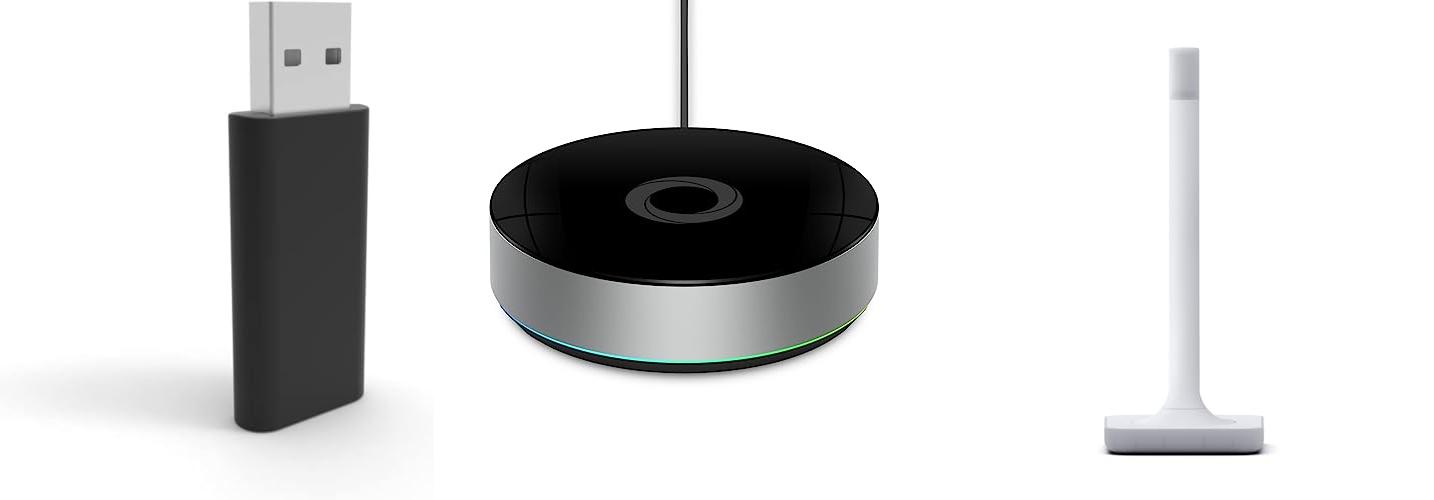
1. Zooz 800 Series Z-Wave Long Range S2 USB Stick ZST39 LR

Rating: 9.2/10
The Zooz 800 Series Z-Wave Long Range S2 USB Stick ZST39 LR is a powerful tool for building your own smart home. It lets you connect many Z-Wave devices to your system. This stick uses the latest Z-Wave Long Range technology. This means it can send signals much farther than older Z-Wave sticks, potentially up to a mile. You can use it with popular smart home software like Home Assistant and HomeSeer.
What We Like:
- Offers incredible Z-Wave Long Range, extending your smart home network up to a mile.
- Uses the latest 800 Series Z-Wave technology for better performance and features.
- Works seamlessly with popular DIY smart home platforms like Home Assistant and HomeSeer.
- Supports Over-The-Air (OTA) firmware updates to keep your stick up-to-date.
- Adds Z-Wave Plus and Z-Wave Long Range capabilities to your existing setup.
What Could Be Improved:
- This product is strictly for advanced users with strong computer and Z-Wave knowledge; beginners should avoid it.
- You must be comfortable with programming to use this device effectively.
- Attempting to restore NVM backups from older 500 or 700 series sticks will permanently damage (brick) the device.
- Using firmware updates not found on the official Zooz support portal will void the warranty and can brick the stick.
- Full Long Range functionality requires your smart home software and end Z-Wave devices to also support this advanced feature.
If you’re an experienced DIY smart home enthusiast looking for extended Z-Wave range and the latest technology, this Zooz stick is a compelling option. Just be sure you have the technical know-how to use it correctly and avoid common pitfalls.
2. Homey Bridge

Rating: 8.7/10
The Homey Bridge is a smart home hub that helps all your devices work together. You can create cool automations, like having your favorite music play when you get home. It connects to many different types of smart devices, making your home smarter and more convenient. You can even control your devices with your voice using Alexa or Google Assistant.
What We Like:
- Lets you control all your smart devices from one place.
- Works with many popular brands like Philips Hue, Sonos, and Nest.
- You can create custom “Flows” to make your home do things automatically.
- Voice control is easy to set up with Amazon Alexa or Google Assistant.
- It prioritizes your privacy, keeping your data safe.
- Comes with 3 months of Homey Premium to try out extra features.
What Could Be Improved:
- You need a Homey Premium subscription to connect more than five devices.
- Homey Premium costs extra after the first three months.
- You need to check the Homey App Store to make sure your devices are compatible.
The Homey Bridge is a powerful tool for anyone looking to simplify their smart home. It offers great compatibility and useful features for making your home work for you.
3. Home Assistant Connect ZWA-2

Rating: 8.8/10
The Home Assistant Connect ZWA-2 is your official ticket to unlocking the power of Z-Wave in your smart home. This hardware is built by the Home Assistant team to seamlessly connect your Z-Wave devices to your Home Assistant system. It’s designed to be user-friendly, making smart home automation easier than ever.
What We Like:
- Precisely Engineered: The antenna and base are perfectly tuned for Z-Wave, giving you a strong and reliable connection.
- Latest Z-Wave Chipset: It uses the newest 800-series chipset, so it works with all Z-Wave devices.
- Z-Wave Benefits: Z-Wave uses its own frequency. This means it cuts through walls better and has less interference than other wireless signals like Zigbee or WiFi, especially in busy homes.
- Long Range: You get more reliable and responsive connections, even to devices far away. It also helps save battery life on your Z-Wave devices.
- Built for Home Assistant: This adapter is made by the people who create Home Assistant and Z-Wave JS.
- Easy Migration: Moving from other Z-Wave adapters to the ZWA-2 is simple, often just a few clicks.
- Plug and Play: Setting up Z-Wave is super easy with a simple setup guide and one-click firmware updates.
- Home-Friendly Design: It looks nice in your home, with a design that’s inspired by a candle and even lights up like one.
What Could Be Improved:
- A Home Assistant system is required to use this adapter; it doesn’t work on its own.
The Home Assistant Connect ZWA-2 makes adding Z-Wave devices to your smart home straightforward and reliable. It’s an excellent choice for anyone looking to expand their Home Assistant setup with the robust Z-Wave protocol.
4. Hubitat Elevation Home Automation Hub (Model C-8 Pro) Compatible with Alexa

Rating: 9.0/10
Take control of your smart home with the Hubitat Elevation Home Automation Hub (Model C-8 Pro). This powerful hub lets you manage all your smart devices locally, making things faster, more reliable, and keeping your data private. It works with over 1000 devices from more than 100 brands, including popular names like Aqara, Philips Hue, and Nest. You can create custom automation rules and scenes right from the hub, no need for extra services.
What We Like:
- Processes commands locally for speed and privacy.
- Works with a huge number of devices from many brands.
- Supports Z-Wave, Zigbee, and Matter for broad compatibility.
- Integrates with Alexa, Apple HomeKit, and Google Home.
- Powerful external antennas boost signal strength and range.
- Connects with Matter bridges to expand device options.
- Offers rich resources for setup, management, and troubleshooting.
What Could Be Improved:
- New users might find some advanced features challenging and need to refer to documentation.
- Hub may require several updates and restarts upon initial setup.
The Hubitat C-8 Pro is a versatile hub for serious smart home enthusiasts. It offers advanced control and wide compatibility for a truly connected home.
5. Hubitat Elevation Home Automation Hub (Model C-8) Compatible with Alexa

Rating: 9.4/10
The Hubitat Elevation Home Automation Hub (Model C-8) is a powerful device that lets you control your smart home devices. It works with many popular brands and makes your home smarter. You can automate lights, locks, thermostats, and more.
What We Like:
- It connects to many smart home systems like Alexa, Apple HomeKit, and Google Home.
- It supports Zigbee, Z-Wave, and Matter, giving you lots of device options.
- Automations run locally on the hub, which makes them fast and reliable, even without internet.
- Your privacy is protected because data stays on the hub.
- It has a free mobile app for controlling your home from anywhere.
- It includes Wi-Fi in addition to an Ethernet connection for more flexible setup.
- It can integrate with Matter Bridges, allowing older Zigbee and Z-Wave devices to work with Matter.
What Could Be Improved:
- New users might find some advanced features a bit tricky to set up.
- It’s recommended to check the compatible devices list before buying to ensure your devices will work.
- The hub might need several updates and restarts when you first turn it on.
The Hubitat Elevation C-8 is a fantastic choice for creating a smart home that is fast, private, and works even when your internet is down. It offers a lot of flexibility for both simple and complex automations.
Your Smart Home’s Brain: The Ultimate Z-Wave Hub Buying Guide
Welcome, smart home enthusiasts! Today, we’re diving deep into the world of Z-Wave hubs. These little devices are the brains of your smart home, letting all your Z-Wave devices talk to each other and to you. Choosing the right one is key to a smooth and happy smart home experience.
1. Key Features to Look For
When you’re shopping for a Z-Wave hub, keep these important features in mind:
- Z-Wave Plus Certification: This is a big one! Z-Wave Plus means the hub works with the latest Z-Wave technology. It offers better range, faster speeds, and longer battery life for your connected devices.
- Compatibility: Make sure the hub works with the Z-Wave devices you already have or plan to buy. Check the product description for a list of supported devices or brands.
- Connectivity Options: Most hubs connect to your home network via Wi-Fi or Ethernet. Some might also have Bluetooth or other wireless options.
- Mobile App: A good Z-Wave hub comes with an easy-to-use mobile app. This app lets you control devices, set up schedules, and receive alerts from anywhere.
- Voice Assistant Integration: Do you use Alexa or Google Assistant? Look for a hub that can connect with them. This lets you control your smart home with your voice.
- Automation Capabilities: The best hubs let you create “scenes” and “automations.” This means you can set devices to do things automatically, like turn on lights when you arrive home or turn off everything when you leave.
2. Important Materials and Design
While the internal technology is most important, the physical design and materials also matter:
- Build Quality: Most Z-Wave hubs are made of durable plastic. You want a device that feels solid and well-made.
- Size and Placement: Hubs are usually small. Consider where you’ll put it. It needs to be near your router for a wired connection or in a central location for good Wi-Fi.
- Indicator Lights: Simple LED lights can tell you if the hub is powered on, connected to your network, and communicating with devices.
3. Factors That Improve or Reduce Quality
Here’s what makes a Z-Wave hub great, and what can hold it back:
Factors That Improve Quality:
- Strong Z-Wave Signal: A good hub broadcasts a powerful Z-Wave signal. This ensures all your devices, even those far away, can communicate reliably.
- Regular Software Updates: The best hubs receive regular updates from the manufacturer. These updates fix bugs, add new features, and improve security.
- User-Friendly Interface: Both the physical setup and the mobile app should be easy to understand and navigate.
- Reliable Performance: The hub should consistently control your devices without lag or errors.
Factors That Reduce Quality:
- Weak Signal Strength: If your hub has a weak Z-Wave signal, devices will disconnect or respond slowly.
- Poor App Design: A confusing or buggy app makes managing your smart home frustrating.
- Lack of Updates: Hubs that don’t get updates can become outdated and less secure.
- Limited Device Support: If the hub doesn’t work with many Z-Wave devices, it limits your smart home options.
4. User Experience and Use Cases
A Z-Wave hub makes your life easier in many ways. Here are some common uses:
- Home Automation: Imagine your lights turning on automatically when you open the door at night. Or your thermostat adjusting itself to save energy. A Z-Wave hub makes this possible.
- Security: Connect Z-Wave door locks, window sensors, and security cameras. You can monitor your home and get alerts if something is wrong, even when you’re not there.
- Convenience: Control lights, smart plugs, and even your garage door opener from your phone. No more getting up to flip a switch!
- Energy Savings: Use smart plugs and thermostats to manage your energy use. Your hub can help you schedule devices to run when electricity is cheaper or turn off when not in use.
Choosing the right Z-Wave hub is an exciting step towards a smarter, more convenient home. Do your research, consider your needs, and get ready to enjoy the benefits of a connected life!
Frequently Asked Questions (FAQ)
Q: What is a Z-Wave hub?
A: A Z-Wave hub is like the central command center for your Z-Wave smart devices. It lets them all connect and work together.
Q: Do I need a Z-Wave hub?
A: Yes, if you want to control Z-Wave devices wirelessly and create automations, you need a Z-Wave hub.
Q: What’s the difference between Z-Wave and Wi-Fi devices?
A: Z-Wave is a wireless protocol designed specifically for smart home devices. Wi-Fi connects to the internet and is used for many devices, but Z-Wave is often more reliable for smart home control.
Q: How do I set up a Z-Wave hub?
A: Setup usually involves plugging in the hub, connecting it to your router, downloading a mobile app, and following the app’s instructions.
Q: Can I control my Z-Wave devices when I’m not home?
A: Yes, most hubs let you control your devices through their mobile app from anywhere with an internet connection.
Q: Will any Z-Wave device work with any Z-Wave hub?
A: Most Z-Wave devices work with Z-Wave Plus certified hubs. However, always check compatibility lists to be sure.
Q: How many devices can a Z-Wave hub support?
A: This varies by hub, but most can support dozens of devices. Some advanced hubs can handle over 200.
Q: Do I need an internet connection for my Z-Wave hub?
A: Yes, you need an internet connection to set up and control most Z-Wave hubs, especially when using the mobile app remotely.
Q: What is Z-Wave Plus?
A: Z-Wave Plus is an upgraded version of Z-Wave technology. It offers improved performance, range, and battery efficiency for your devices.
Q: Are Z-Wave hubs secure?
A: Reputable Z-Wave hubs use encryption to protect your data and communications. Keeping your hub’s software updated is also important for security.
In conclusion, every product has unique features and benefits. We hope this review helps you decide if it meets your needs. An informed choice ensures the best experience.
If you have any questions or feedback, please share them in the comments. Your input helps everyone. Thank you for reading.